
Gaming PC Liquid Damage & Overheating Repair
Liquid exposure, erratic behaviour and severe internal dust contamination – professionally cleaned, decontaminated and tested in Cheadle HulmeOnce opened, another major problem became immediately apparent: the inside of the computer was heavily contaminated with dust and dense lint, restricting airflow through the case.
The system was dismantled, inspected for liquid contamination, thoroughly cleaned and treated before being rebuilt and tested.
A gaming PC running at 72°C while idle
The customer brought this gaming computer in following a liquid spill because the machine had begun behaving erratically.
During the initial inspection, the CPU was also running at around 72°C while the computer was effectively idle.
That is far higher than we would expect from a correctly functioning desktop cooling system under minimal load and justified a full internal inspection rather than simply dealing with the reported liquid exposure.
Once the side panels were removed, the extent of the internal contamination was obvious.
Large quantities of dust and lint had accumulated around the wiring, lower chassis and airflow paths.
This machine therefore had two issues requiring attention:
- Possible contamination following liquid exposure
- Severe dust and lint accumulation affecting cooling and airflow

The internal contamination was severe
This was considerably more than the light layer of dust normally found inside an older desktop computer.
Thick lint had collected around the cabling, chassis and ventilation areas. Material like this can interfere with the designed airflow through the case and acts as an insulating layer around components.
These are photographs of the actual machine during the repair in our Cheadle Hulme workshop.
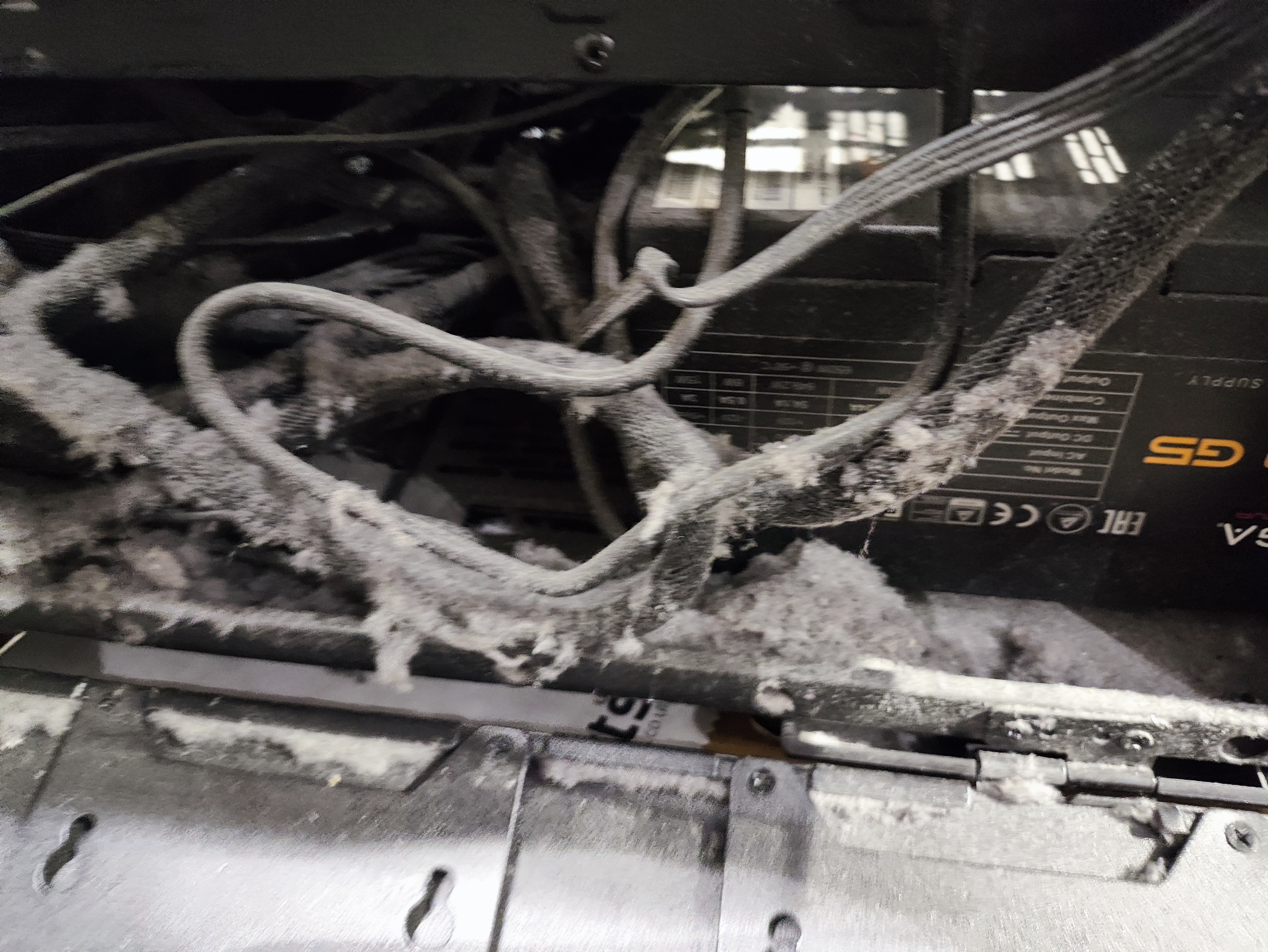
Heavy deposits of lint had built up across the lower section of the computer.
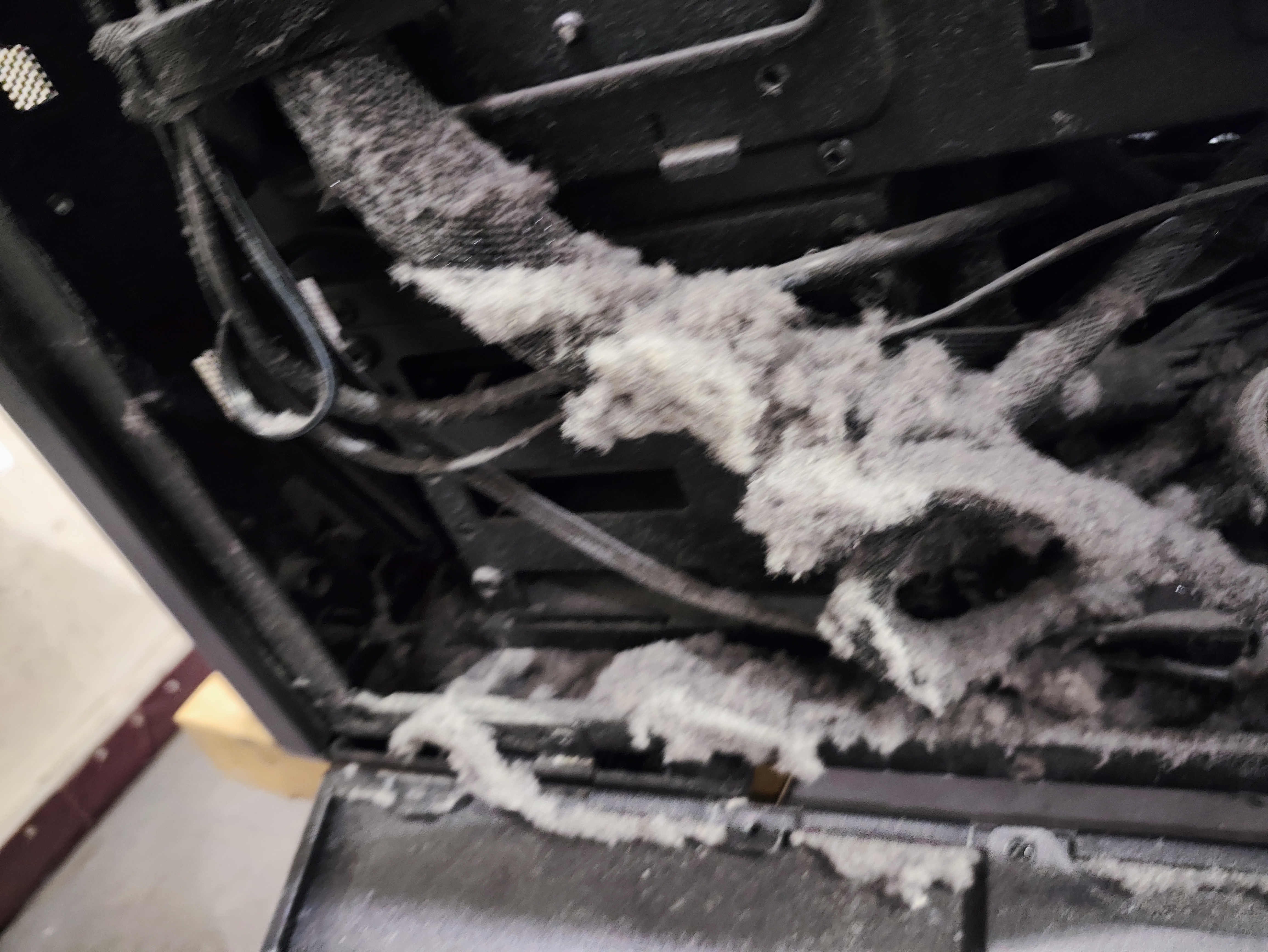
Dust was wrapped around the cabling rather than simply resting on exposed surfaces.
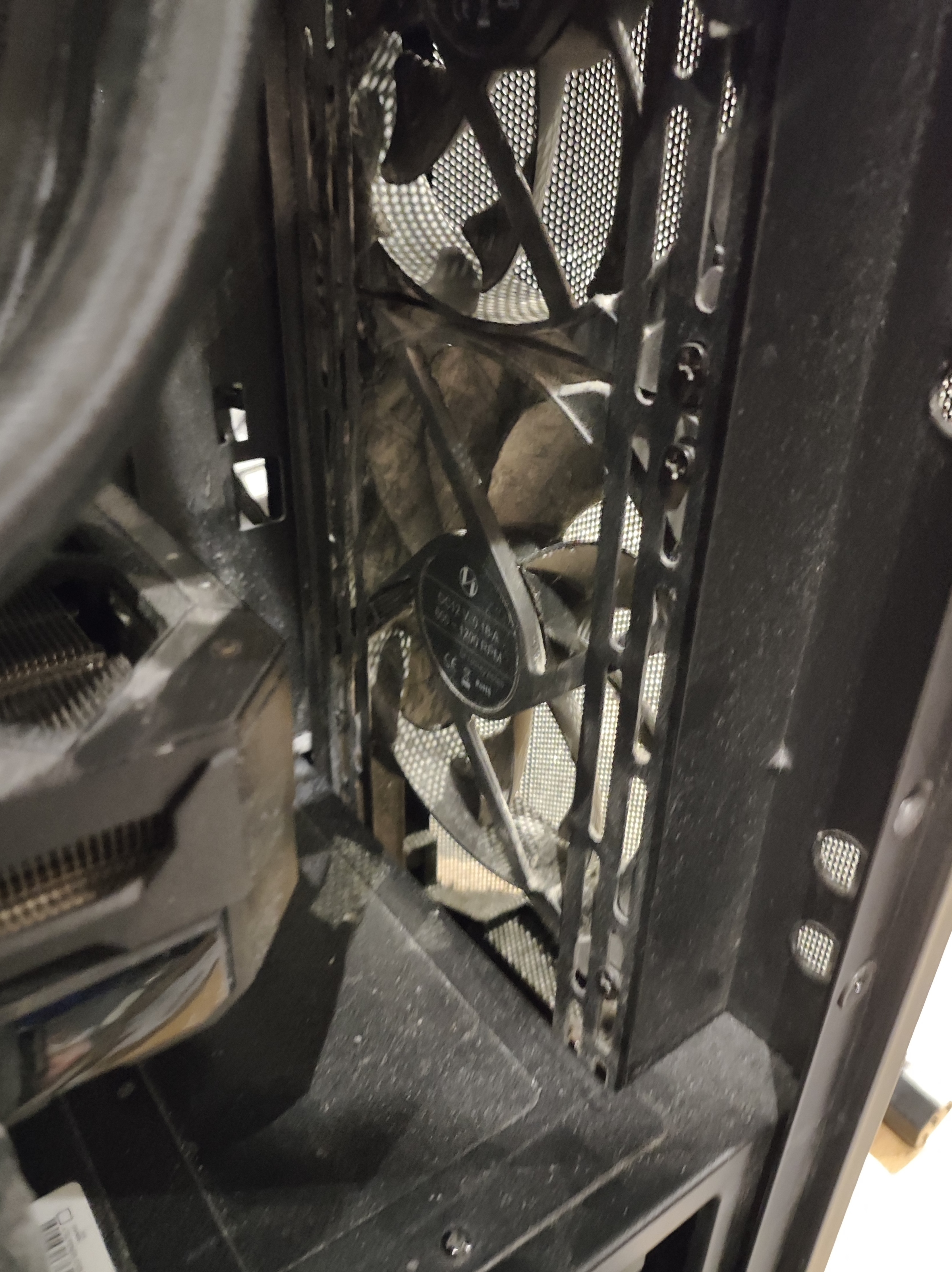
Dust had also reached the case cooling and ventilation areas.
Why 72°C at idle needed investigating
Modern gaming processors are designed to operate safely at considerably higher temperatures while working hard, so a high temperature during gaming does not automatically indicate a fault.
The important detail here was that this computer was reaching approximately 72°C without a significant workload.
A high idle temperature can indicate poor heat transfer, restricted airflow, incorrect cooler operation, pump problems, fan faults or a combination of issues.
Rather than assuming the cause, we inspected the machine and cooling system as part of the repair.
Before repair
CPU idle temperature:
~72°C
This reading was taken before the machine was cleaned and repaired.

Liquid damage needs careful inspection
A computer that has been exposed to liquid should not simply be dried externally and switched back on.
Liquid can travel beneath components, into connectors and onto circuit boards where contamination may remain after the visible moisture has evaporated.
Depending on what has been spilled, residue can also become conductive or corrosive.
For this machine we inspected the affected areas and cleaned contamination using appropriate electronics-cleaning techniques and isopropyl alcohol where required.
The aim is to remove contamination rather than merely waiting for moisture to disappear.
Cleaning and decontaminating the gaming PC
The computer required a thorough internal clean rather than simply blowing compressed air through the case.
Components and accessible areas were inspected individually so contamination could be removed without forcing debris deeper into connectors, fans or electronic assemblies.
1. Internal inspection
2. Dust and lint removal
3. Electronics cleaning
4. Reassembly and testing
From approximately 72°C to 30°C
After cleaning, rebuilding and testing the gaming PC, the processor temperature was checked again.
The ASUS motherboard BIOS reported a CPU temperature of approximately 30°C, with the motherboard itself at approximately 25°C.
That compares with the approximately 72°C idle CPU temperature recorded before the repair.
The result represents a reduction of around 42°C under the respective low-load test conditions.
We do not claim that dust alone caused the original temperature because several factors can affect CPU temperature. What we can demonstrate is the condition in which the machine arrived, the work completed and the temperature observed afterwards.
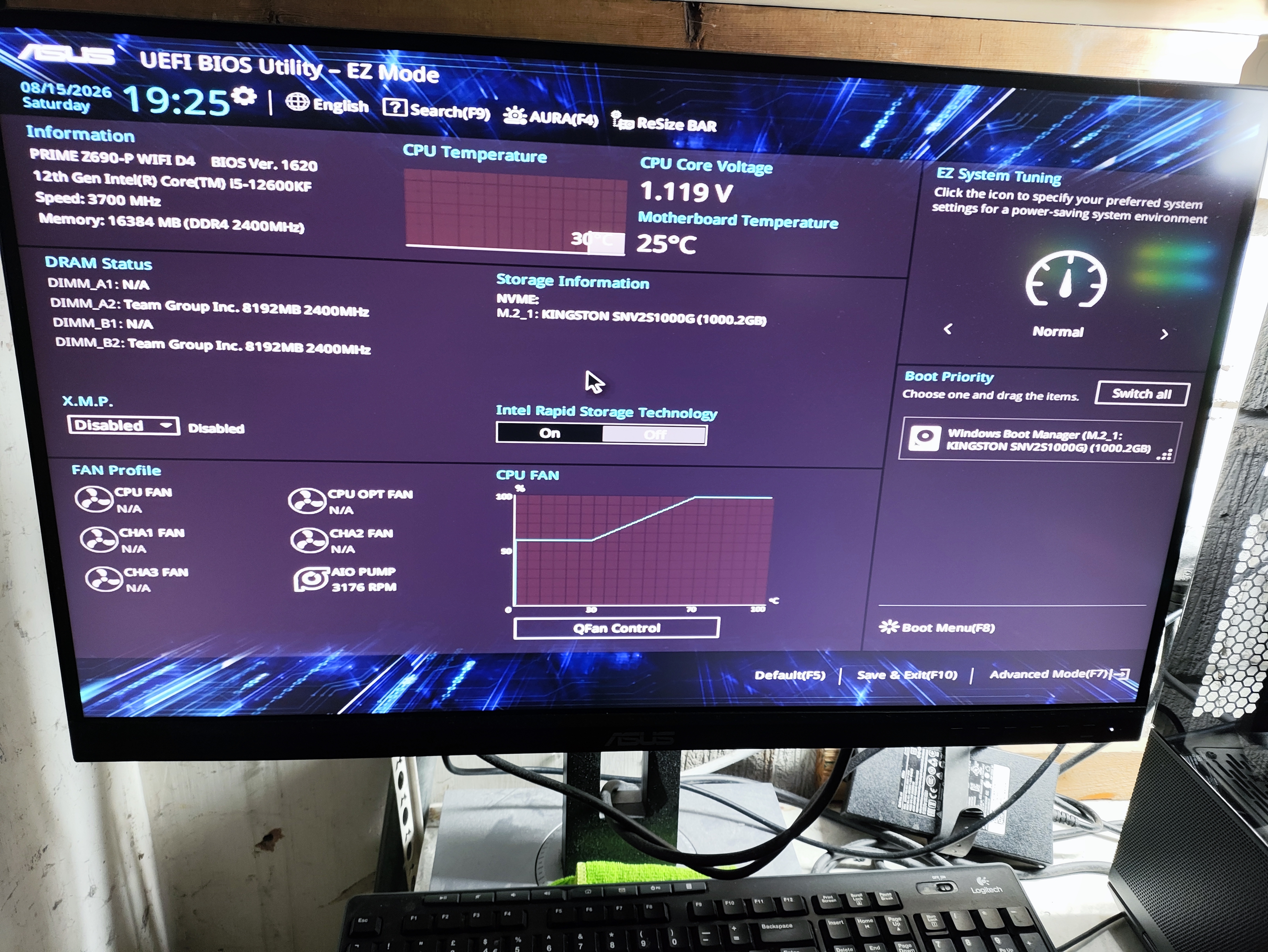

The system was tested after cleaning
Cleaning a heavily contaminated computer is only part of the job.
Following reassembly, the machine was powered on and checked for normal operation and stability.
Particular attention was paid to the cooling system because of the unusually high temperature recorded before repair.
The computer successfully started and the significantly reduced CPU temperature demonstrated that the cooling system was operating far more effectively after the work had been completed.
⚠
If liquid gets into your computer
Switch it off and disconnect the power as soon as it is safe to do so.
Do not repeatedly try to turn the computer back on to see whether it has recovered.
A machine can appear to work immediately after a spill while liquid or conductive residue remains elsewhere inside.
Early inspection and cleaning can substantially improve the chances of avoiding further damage.
Signs your gaming PC may need cleaning
Gaming computers move large volumes of air through the case and can accumulate significant dust over time.
Warning signs include:
- CPU or GPU temperatures increasing over time
- Fans running faster or becoming noticeably louder
- High temperatures while the computer is idle
- Thermal throttling during gaming
- Unexpected shutdowns or restarts
- Visible dust around vents or filters
- Poor airflow through the case
A light coating of dust is normal. Dense contamination like that found inside this machine can materially interfere with cooling and should be removed properly.
Actual repair result
Before:
~72°C CPU idle
After:
~30°C CPU temperature during BIOS testing
Difference:
~42°C lower
Gaming PC repairs in Cheadle Hulme
Dreambytes Computers repairs gaming PCs experiencing overheating, instability, cooling problems, liquid contamination and other hardware faults.
Each machine is diagnosed individually rather than assuming that similar symptoms always have the same cause.
Real workshop repairs
Every photograph on this page shows the actual customer gaming PC repaired in our Cheadle Hulme workshop.
We use photographs from our own repairs rather than stock imagery so customers can see the faults we diagnose and the work involved.
Frequently asked questions
Can a liquid damaged gaming PC be repaired?
Is 72°C too hot for a gaming PC?
Can dust really make a gaming PC overheat?
How often should a gaming PC be cleaned?
Should I turn a PC on after spilling liquid on it?
Do you repair gaming PCs in Stockport?
Another real repair from our workshop
This repair joins our growing collection of genuine customer repairs carried out by Dreambytes Computers.
See how we diagnose and repair real hardware faults using photographs taken during the work.
Gaming PC overheating or affected by liquid?
Dreambytes Computers provides gaming PC diagnostics, cleaning and hardware repair from our Cheadle Hulme workshop, with collection and return available throughout Stockport and surrounding areas.
Send us details of the problem and we’ll advise on the next step.